Catch it before it ships.
dokwe security checks your dependencies, secrets, code and deploy settings on your own machine, with no account and nothing uploaded. On Dokwe, the same scan can hold a deploy until someone decides.
$ dokwe security

Leaked secrets (1)
  CRITICAL Stripe access token in app/settings.py
           app/settings.py:3
           Fix: load it from an environment variable,
           and revoke the key.

Vulnerable dependencies (1)
  CRITICAL django 3.2.0 has 38 known vulnerabilities
           Fix: Upgrade django to 5.2.17 or later.

2 problems: 2 critical
Scanned 6 files and 2 packages in 2.1s, on this machine.
Four kinds of problem, one command.
Your lockfiles checked against the OSV database, with the version that fixes them.
Hundreds of key formats, masked in the output. Add --history for your git history.
29 rules for JS and TS, Python, PHP, Go and Ruby: SQL from strings, eval, TLS checks off and more.
Dockerfiles running as root, secrets in images, debug mode on, a committed .env.
Three places it runs.
On your machine
Run dokwe security in your project. The first run downloads the scanner and checks it before use.
In CI
Fail the build on findings and show them on pull requests with SARIF.
--fail-on critical
On every deploy
Dokwe scans after cloning and before building. A finding at your project's level holds the deploy for an owner or admin.
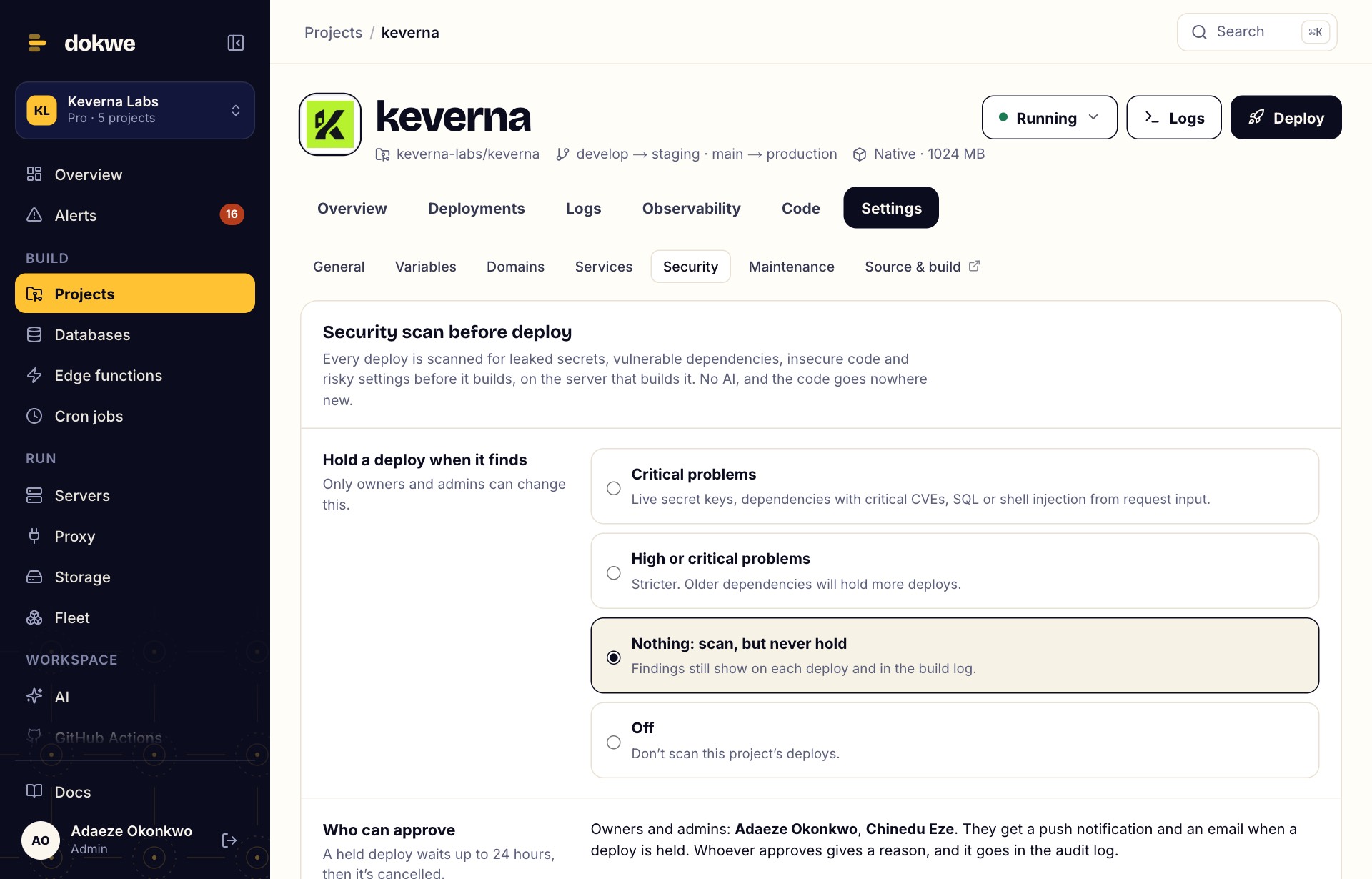
Risky deploys wait for a person.
Your project, your threshold
Hold on critical (the default), hold on high or critical, scan but never hold, or off.
Owners and admins decide
They get an email and can proceed or cancel. Proceeding needs a reason, and it goes in the audit log.
Nothing waits forever
A held deploy is cancelled after 24 hours if nobody decides.
Scans where it builds
On your own servers, the agent runs the scan and only sends the findings to Dokwe.
Nothing leaves your machine
Locally, a network guard blocks every connection except the public vulnerability database download.
Share the findings
Export any deploy's findings as CSV, Markdown or JSON.
Works in GitHub Actions.
Install the CLI, run the scan, upload SARIF. Findings show on the pull request.
- run: curl -sSL https://dokwe.com/install-cli.sh | bash
- run: dokwe security --yes --history \
      --sarif results.sarif --fail-on critical
- uses: github/codeql-action/upload-sarif@v3
  if: always()
  with:
    sarif_file: results.sarif
Good questions, straight answers.
Do I need a Dokwe account to scan?
No. dokwe security runs without logging in, and only downloads public vulnerability data.
Is my code uploaded?
No. A network guard blocks every connection except the public OSV database download, and the report tells you if anything tried.
What happens to a deploy with a critical finding?
By default it waits. An owner or admin either proceeds, giving a reason that goes into the audit log, or cancels. If nobody decides in 24 hours, it's cancelled.
Can I make it stricter or turn it off?
Yes, per project: hold on critical, hold on high or critical, scan but never hold, or off.
How do I silence a finding I've reviewed?
Add a dokwe-ignore comment on the line or the line above.
Does it work in GitHub Actions?
Yes. Use --yes to skip the download prompt, --fail-on for the threshold, and --sarif to show findings on pull requests.
Run your first scan in a minute.
Install the CLI and run dokwe security in your project.